
Presentation
Caledonian PRO PHP Calendar is a user friendly, php based and multi-user calendar/scheduling script. It has so many great features like timeline, multiple calendars, shared calendars, event reminder, multiple language support and so on. You can customize it easily and use as a standalone scheduling application or integrate into your own application. You just need a web browser or HTML5 supported mobile device to use it.
Features
- Multi-language
- Two-level admnistration
- Responsive
- Bootstrap supported
- Import (iCalendar)
- Event Icon & Colors
- Upcoming Events
- Event Copier
- RSS Feed
- Event Share Buttons (AddThis)
- Move Posts to Another User (User Removing)
- Widgets
- Full Calendar
- Mini Calendar
- Upcoming Events (Ajax & Iframe)
- Today's Events (Ajax & Iframe)
- Navbar Notices (Bootstrap, Sound and Animated)
- Pop-up Master (Lightbox)
- Event Lister (With Pagination)
- API
- Add
- Remove
- List
Requirements
- PHP Version 5.4+
- MySQLi Extension
- Curl Extension
- Script Timeout
- Writable Folders
Optional - Script Execute Time (Unlimited)
- Upload Limit (10MB)
- Post Max Size (10MB)
- mb_substr() function
Installation
STEP 1 : REQUIREMENTS
Required functions must be installed on your server. If all options marked as green tick, please click to NEXT button
STEP 2 : DATABASE SETTINGS
Create a MySQL database on your hosting panel.
Here a examples for famous hosting control panels
1. Database host address or IP number
2. Database name as you created
3. Database login name as you created
4. Database password as you created
5. Database table prefix (example: cal_ or calendar_) Do not use space or unwanted characters!
6. Click to TEST CONNECTION button.
7. If button goes green color continue installation with NEXT button, else check your DB informations.
STEP 3 : GENERAL SETTINGS
Default Timezone
If your local time different from server time. You can choose correct local time in listbox.
Default Language
Languages controlled by cookies. Please define default language for your new guests.
APP URL
Caledonian application URL. URL generated automatically, please change it if its not correct
System E-Mail
Password reminder and other mail submission actions sender mail.
Upcoming Event List Number
Jusr required for dashboard. (Not for widgets)
Import file maximum size
Maximum file size for ICS files
API Public Key
Required for API connections. You can change it with reload button.
API Private Key
Required for API connections. You can change it with reload button.
License Key
Envato purchase key. You must enter valid key for installation. keys generated by Envato when you purchase Caledonian PRO.
Share Buttons
It will enable share buttons in your event details page.
Author Informations
It will enable event author informations in your event details page.
Pointips
Inline helper icons.
Debug Mode
If you have trouble with Caledonian, you can turn-on debug mode to find error resources.
STEP 4 : PRIMARY USER INFORMATIONS
Primary administration account creator. This user cannot be deleted or turn-off to inactive mode.
STEP 5 : COMPLETE
Click to Install Now button. It will show errors or success texts as your entered infrormations.
MySQL Syntax errors;
If you get MySQL syntax error after install Caledonian. It could be STRICT_TRANS_TABLES issue for your hosting service. Please check your MySQL config file for that.
INSTALLATION VIDEO
General Settings
Default Timezone
If your local time different from server time. You can choose correct local time in listbox.
Default Language
Languages controlled by cookies. Please define default language for your new guests.
APP URL
Caledonian application URL. URL generated automatically, please change it if its not correct
System E-Mail
Password reminder and other mail submission actions sender mail.
Upcoming Event List Number
Jusr required for dashboard. (Not for widgets)
Import file maximum size
Maximum file size for ICS files
API Public Key
Required for API connections. You can change it with reload button.
API Private Key
Required for API connections. You can change it with reload button.
License Key
Envato purchase key. You must enter valid key for installation. keys generated by Envato when you purchase Caledonian PRO.
Share Buttons
It will enable share buttons in your event details page.
Author Informations
It will enable event author informations in your event details page.
Pointips
Inline helper icons.
Debug Mode
If you have trouble with Caledonian, you can turn-on debug mode to find error resources.
Administration
There 2 level administration type available.
Admin
Users with full access.
- Admin could be create new admin and normal user accounts.
- They're can see all events, also edit and remove from system
- Widget creation
- API handler permissions
User
Basic event manager. Users only can be create new events and edit their own records.
Event Creation
There 3 way available for event creation.
1- From Navigation Bar

2- From Calendar Day
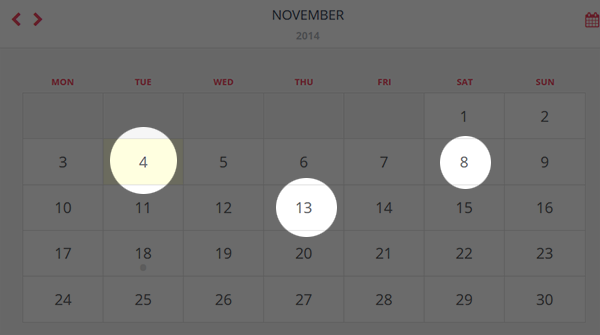
3- From Event Detail Pane
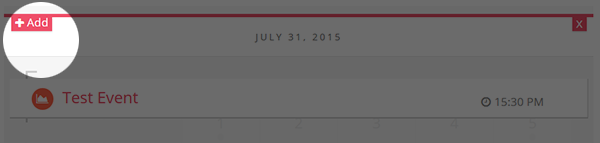
Create New Event
1 - Choose a user (Only for Admin)
2 - Enter a Event Title
3 - Choose a date and hour / minutes
4 - Choose Icon and Color (Optional)
5 - Enter Event Details
6 - Also you can copy event to another days
Calendar Drawing
If you do not want to use widgets, you can easily call Calendar structure.
How to prepare page for calendar?
HEAD TAG
<!-- JQuery -->
<script src="../valve/Scripts/jquery-1.11.3.min.js"></script>
<!-- Bootstrap -->
<link rel="stylesheet" href="../valve/bootstrap/css/bootstrap.min.css">
<link rel="stylesheet" href="../valve/bootstrap/css/flatly_bootstrap.min.css">
<!-- Calendario -->
<link rel="stylesheet" type="text/css" href="../valve/calendario/calendar.css" />
<link rel="stylesheet" type="text/css" href="../valve/calendario/custom_2.css" />
<script type="text/javascript" src="../valve/calendario/modernizr.custom.63321.js"></script>
<script type="text/javascript" src="../valve/calendario/jquery.calendario.js"></script>
<!-- Fancybox -->
<link href="../valve/fancybox/jquery.fancybox.css" rel="stylesheet" type="text/css" />
<!-- Caledonian -->
<link rel="stylesheet" href="../valve/css/cal.css">
PAGE CONTENT
<?php

	$calendar = new caledonian(); # Calendar class
	$calendar->calDate = '2015-05-21'; # Default Date
	echo('<div id="sdr-calendar"></div>'); # You can change container style with CSS
	echo($calendar->getCalendar()); # Calendar drawing

?>
END OF PAGE BODY
<!-- Bootstrap -->
<script src="../valve/bootstrap/js/bootstrap.min.js"></script>
<!-- Fancybox -->
<script src="../valve/fancybox/jquery.fancybox.pack.js" type="text/javascript"></script>
<!-- Caledonian -->
<script src="../valve/Scripts/caledonian.js"></script>
Call Upcoming Events
If you do not want to use widgets, you can easily call upcoming event list. It will return array based records.
<?php
	$upcList = new caledonian();
	$upcList->widgetOn = true;
	$upcList->widgetFetchData = 2;
	$upcList->widgetUser = 0;
	$upcList->widgetDataCount = 5;
	$upcList = $upcList->upcoming(true); # Show 1 hour expiration, default true
?>
Returns
array > error = true / false (If there no record found, it will return false)
array > data = Event List (array)
Data Keys
note_id = Event ID
user_id = Author ID
title = Event Title
mynotes = Event Details
add_date = Creation Date
note_date = Event Date
note_icon = Event Icon (Font Awesome)
note_color = Icon Color
ip_address = Creator IP Address
data_type = Data Type -> 1 - Private // 0 - Public
Class Settings
->widgetOn = Will enable user selection and data count
->widgetUser = User base event list, you must kow user IDs or leave 0
->widgetFetchData = Data type selection 0 - Public, 1 - Private, 2 - All Datas
->widgetDataCount = Maximum event list number
How To Write Events to Page
<?php
	if($upcList['error']){
		echo('No Record Found!');
	}else{
		foreach($upcList['error'] as $k=>$v){
			echo('
					Title: '. $v['title'] .'<br>
					Date: '. $v['note_date'] .'<br>
					<hr>
				');
		}
	}
?>
Call Today's Events
If you do not want to use widgets, you can easily call today's event list. It will return array based records.
<?php
	$upcList = new caledonian();
	$upcList->widgetOn = true;
	$upcList->widgetFetchData = 2;
	$upcList->widgetUser = 0;
	$upcList->widgetDataCount = 5;
	$upcList = $upcList->todays(true); # Show 1 hour expiration, default true
?>
Returns
array > error = true / false (If there no record found, it will return false)
array > data = Event List (array)
Data Keys
note_id = Event ID
user_id = Author ID
title = Event Title
mynotes = Event Details
add_date = Creation Date
note_date = Event Date
note_icon = Event Icon (Font Awesome)
note_color = Icon Color
ip_address = Creator IP Address
data_type = Data Type -> 1 - Private // 0 - Public
Class Settings
->widgetOn = Will enable user selection and data count
->widgetUser = User base event list, you must kow user IDs or leave 0
->widgetFetchData = Data type selection 0 - Public, 1 - Private, 2 - All Datas
->widgetDataCount = Maximum event list number
How To Write Events to Page
<?php
	if($upcList['error']){
		echo('No Record Found!');
	}else{
		foreach($upcList['error'] as $k=>$v){
			echo('
					Title: '. $v['title'] .'<br>
					Date: '. $v['note_date'] .'<br>
					<hr>
				');
		}
	}
?>
Call All Event List
If you do not want to use widgets, you can easily call all event list. It will return array based records.
Its same with other list but, returned array contain pagination data.
<?php
	$upcList = new caledonian();
	$upcList->widgetOn = true;
	$upcList->widgetFetchData = $widget['widget_data'];
	$upcList->widgetUser = $widget['data_user'];
	$upcList->widgetDataCount = $widget['max_data'];
	$upcList = $upcList->listEvent(true); # Show 1 hour expiration, default true
?>
Returns
array > error = true / false (If there no record found, it will return false)
array > data = Event List (array)
array > pages = Pagination list. <ul> based, also bootstrap pagination style supported.
Data Keys
note_id = Event ID
user_id = Author ID
title = Event Title
mynotes = Event Details
add_date = Creation Date
note_date = Event Date
note_icon = Event Icon (Font Awesome)
note_color = Icon Color
ip_address = Creator IP Address
data_type = Data Type -> 1 - Private // 0 - Public
Class Settings
->widgetOn = Will enable user selection and data count
->widgetUser = User base event list, you must kow user IDs or leave 0
->widgetFetchData = Data type selection 0 - Public, 1 - Private, 2 - All Datas
->widgetDataCount = Page data number for each pages.
How To Write Events to Page
<?php
	if($upcList['error']){
		echo('No Record Found!');
	}else{
		foreach($upcList['error'] as $k=>$v){
			echo('
					Title: '. $v['title'] .'<br>
					Date: '. $v['note_date'] .'<br>
					<hr>
				');
		}
                echo($upcList['pages']);
	}
?>
Import Events
You can easily import iCalendar files to your Caledonian. Admins can choose users for imported events.
Widgets
Caledonian PRO provides, advanced event listing features. You can use our simple ready-to-use widgets.
Full Calendar
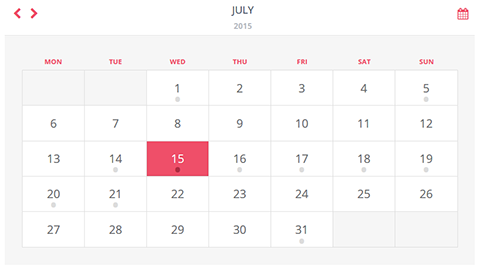
Caledonian default calendar style. Calendar style already supported responsive features. But you can use that widget without external plugins or css styles in your front-end page.
Just works with simple iframe embed code.
How to create Full Calendar Widget?
- Go to Widgets Section and Click to Add Button
Enter your Widget name, and choose full calendar widget from listbox (Widget Type) New setting form fields will appear.
User;
You can show events for specific user or all events.
Data Type;
You can share of your events with Public, Private or All options.
Plugins;
Please choose plugins if you do not modify of Caledonian's widget iframe page.
After widget creation, it will give a embed code, you can use that code where you want to show your calendar in your front-end page.
Mini Calendar
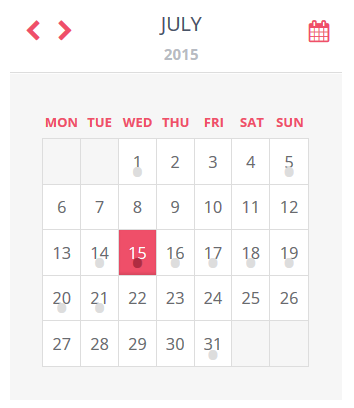
Caledonian default calendar style. Calendar style already supported responsive features. But you can use that widget without external plugins or css styles in your front-end page.
Just works with simple iframe embed code.
How to create Mini Calendar Widget?
- Go to Widgets Section and Click to Add Button
Enter your Widget name, and choose mini calendar widget from listbox (Widget Type) New setting form fields will appear.
User;
You can show events for specific user or all events.
Data Type;
You can share of your events with Public, Private or All options.
Plugins;
Please choose plugins if you do not modify of Caledonian's widget iframe page.
After widget creation, it will give a embed code, you can use that code where you want to show your calendar in your front-end page.
Upcoming Event List
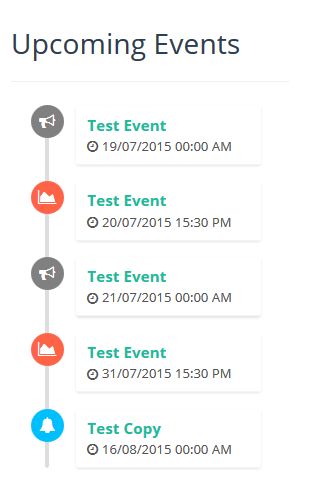
Upcoming event lister. Widget calling styled events. If you want to call array based events, you should be use this code in your page;
<?php
include_once('CALEDONIAN_ROOT/caledonian.php');
$event = new caledonian();
$data = $event->upcoming();
?>
$data variable will return 2 array key $data['error'] and $data['data']
You can control available events with error key 0 - There no event found, 1- Event found
Just works with simple iframe embed code and ajax call.
How to create Upcoming Event Widget?
- Go to Widgets Section and Click to Add Button
Enter your Widget name, and choose Upcoming Event widget from listbox (Widget Type) New setting form fields will appear.
User;
You can show events for specific user or all events.
Data Type;
You can share of your events with Public, Private or All options.
Maximum Event List;
You can define a number of event count
Plugins;
Please choose plugins if you do not modify of Caledonian's widget iframe page.
After widget creation, it will give a embed code, you can use that code where you want to show your calendar in your front-end page. Ajax call requires external plugins top of your page.
<!-- Fancybox -->
<link href="../valve/fancybox/jquery.fancybox.css" rel="stylesheet" type="text/css" />
<!-- Caledonian -->
<link rel="stylesheet" href="../valve/css/cal.css">

<!-- Fancybox -->
<script src="../valve/fancybox/jquery.fancybox.pack.js" type="text/javascript"></script>
<!-- Caledonian -->
<script src="../valve/Scripts/caledonian.js"></script>
Today's Events
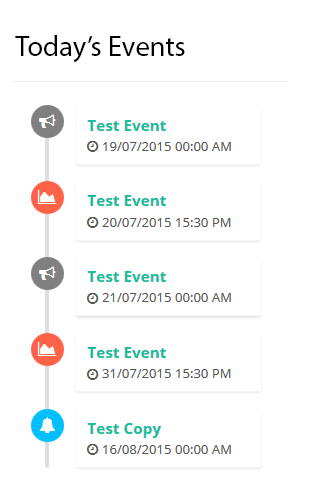
Today's event lister. Widget calling styled events. If you want to call array based events, you should be use this code in your page;
<?php
include_once('CALEDONIAN_ROOT/caledonian.php');
$event = new caledonian();
$data = $event->todays();
?>
$data variable will return 2 array key $data['error'] and $data['data']
You can control available events with error key 0 - There no event found, 1- Event found
Just works with simple iframe embed code and ajax call.
How to create Today's Event Widget?
- Go to Widgets Section and Click to Add Button
Enter your Widget name, and choose Today's Event widget from listbox (Widget Type) New setting form fields will appear.
User;
You can show events for specific user or all events.
Data Type;
You can share of your events with Public, Private or All options.
Maximum Event List;
You can define a number of event count
Plugins;
Please choose plugins if you do not modify of Caledonian's widget iframe page.
After widget creation, it will give a embed code, you can use that code where you want to show your calendar in your front-end page. Ajax call requires external plugins top of your page.
<!-- Fancybox -->
<link href="../valve/fancybox/jquery.fancybox.css" rel="stylesheet" type="text/css" />
<!-- Caledonian -->
<link rel="stylesheet" href="../valve/css/cal.css">

<!-- Fancybox -->
<script src="../valve/fancybox/jquery.fancybox.pack.js" type="text/javascript"></script>
<!-- Caledonian -->
<script src="../valve/Scripts/caledonian.js"></script>
Navbar Notices
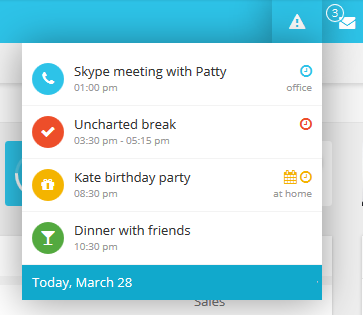
Navbar Notices widget using Bootstrap Navbar feature. Navbar should be created on your page. Click here for detailed informations.
Navbar Notices best solution for back-end page task controls. Its contain animated button, sound effect and live controls.
How to create Navbar Notices Widget?
- Go to Widgets Section and Click to Add Button
Enter your Widget name (Name will be used for button label!), and choose Navbar Notices widget from listbox (Widget Type) New setting form fields will appear.
User;
You can show events for specific user or all events.
Data Type;
You can share of your events with Public, Private or All options.
Maximum Event List;
You can define a number of event count
Refresh Time;
Second based recent task controller. If you enter 15, every 15 second system will check your tasks.
Sound;
If you want to warning alerts for recent tasks, you must be turn-on sound option. And choose a sound effect list below. 10 sound effect included.
Plugins;
Please choose plugins if you do not modify of Caledonian's widget iframe / ajax page.
After widget creation, it will give a embed code, you can use that code where you want to show your calendar in your front-end page. Ajax call requires external plugins top of your page. Embed code already had these plugins, but if you use these plugins before you can remove plugin links.
How to create navbar?
You can check this page for detailed informations.
Here a example navbar;
		<nav class="navbar navbar-inverse">
		  <div class="container-fluid">
			<!-- Brand and toggle get grouped for better mobile display -->
			<div class="navbar-header">
			  <button type="button" class="navbar-toggle collapsed" data-toggle="collapse" data-target="#bs-example-navbar-collapse-1" aria-expanded="false">
				<span class="sr-only">Toggle navigation</span>
				<span class="icon-bar"></span>
				<span class="icon-bar"></span>
				<span class="icon-bar"></span>
			  </button>
			  <a class="navbar-brand" href="#">Brand</a>
			</div>

			<!-- Collect the nav links, forms, and other content for toggling -->
			<div class="collapse navbar-collapse" id="bs-example-navbar-collapse-1">
			  <ul class="nav navbar-nav">
				<li class="active"><a href="#">Link <span class="sr-only">(current)</span></a></li>
				<li><a href="#">Link</a></li>
				<li class="dropdown">
				  <a href="#" class="dropdown-toggle" data-toggle="dropdown" role="button" aria-haspopup="true" aria-expanded="false">Dropdown <span class="caret"></span></a>
				  <ul class="dropdown-menu">
					<li><a href="#">Action</a></li>
					<li><a href="#">Another action</a></li>
					<li><a href="#">Something else here</a></li>
					<li role="separator" class="divider"></li>
					<li><a href="#">Separated link</a></li>
					<li role="separator" class="divider"></li>
					<li><a href="#">One more separated link</a></li>
				  </ul>
				</li>
			  </ul>
			  <form class="navbar-form navbar-left" role="search">
				<div class="form-group">
				  <input type="text" class="form-control" placeholder="Search">
				</div>
				<button type="submit" class="btn btn-default">Submit</button>
			  </form>
			  <ul class="nav navbar-nav navbar-right">
				<li><a href="#">Link</a></li>
				<li class="caledonian dropdown"></li>
				<li class="dropdown">
				  <a href="#" class="dropdown-toggle" data-toggle="dropdown" role="button" aria-haspopup="true" aria-expanded="false">Dropdown <span class="caret"></span></a>
				  <ul class="dropdown-menu">
					<li><a href="#">Action</a></li>
					<li><a href="#">Another action</a></li>
					<li><a href="#">Something else here</a></li>
					<li role="separator" class="divider"></li>
					<li><a href="#">Separated link</a></li>
				  </ul>
				</li>
			  </ul>
			</div><!-- /.navbar-collapse -->
		  </div><!-- /.container-fluid -->
		</nav>
Pop-up Master
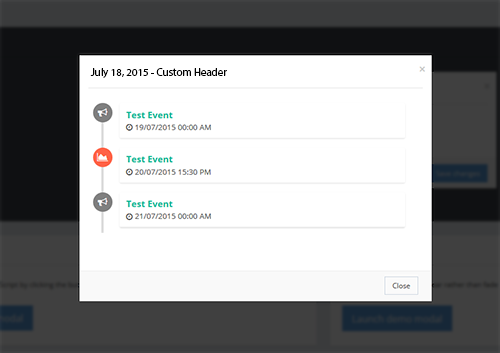
You can list of your events between two dates with lightbox opener.
Pop-up will show upcoming event lister. Widget calling styled events.
How to create Pop-up Widget?
- Go to Widgets Section and Click to Add Button
Enter your Widget name, and choose Pop-up Master widget from listbox (Widget Type) New setting form fields will appear.
User;
You can show events for specific user or all events.
Data Type;
You can share of your events with Public, Private or All options.
Maximum Event List;
You can define a number of event count
Date Range Start / End
Pop-up will appear between two dates. Start date and End date. Please choose your dates.
Event Lister
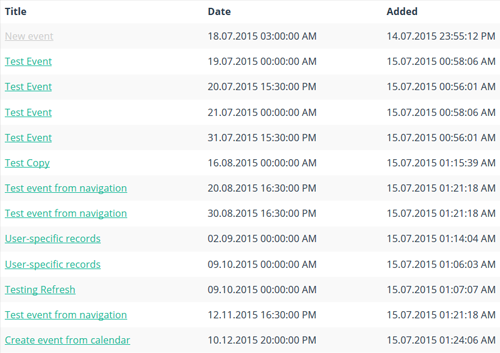
You can list all events by iframe. Also widget contain paganiation feature.
How to create Event Lister Widget?
- Go to Widgets Section and Click to Add Button
Enter your Widget name, and choose Event Lister widget from listbox (Widget Type) New setting form fields will appear.
User;
You can show events for specific user or all events.
Data Type;
You can share of your events with Public, Private or All options.
Maximum Event List;
You can define a number of event count (pagination count)
API Usage
You can control of your events from remote server. There 3 API action available right now.
- Event List
- Add Event
- Delete Event
API Calls
- API url: /api/v1/
- End Points:
- lists/
- add/
- delete/
- Data Type: POST
- Data Return: JSON
- API Key POST Variable: apiKey
How To Use API Hook?
You can find sample API actions, in api.test.php file. There ready-to-use Curl based class available.
API List
Required POST variables;
$_POST['from'] = List Start Date (YYYY-MM-DD)
$_POST['to'] = List End Date (YYYY-MM-DD)
$_POST['offset'] = Page Offset Value (Numeric)
$_POST['count'] = Page Data Limit (Numeric)
API Add
$_POST['title'] = 'Test From API'; # Event Title
$_POST['event'] = 'Test From API Details';  # Event Detail
$_POST['event_date'] = '2015-07-11';  # Event Date
$_POST['user'] = '083535632f263bc92ff8044e6aad58c7'; # User Public Key
$_POST['ip'] = $_SERVER['REMOTE_ADDR']; # IP Address
$_POST['icon'] = 'fa fa-users'; # Optional
$_POST['color'] = 'magenta'; # Optional
API Delete
$_POST['id'] = 3; # Event ID
$_POST['user'] = '083535632f263bc92ff8044e6aad58c7'; # User Public Key
Example API Call
<?php
		$post_data = ((!is_array($_POST)) ? array():$_POST);
		$post_data['apiKey'] = "YOUR PRIVATE API KEY";
		foreach($post_data as $key=>$value) { $fields_string .= $sep.$key.'='.urlencode($value); $sep='&'; }

		$options = array(
			CURLOPT_URL => "https://www.example.com/api/v1/add/",
			CURLOPT_HEADER         => false,    // don't return headers
			CURLOPT_ENCODING       => "",       // handle all encodings
			CURLOPT_USERAGENT      => "Caledonian", // who am i
			CURLOPT_CONNECTTIMEOUT => 120,      // timeout on connect
			CURLOPT_TIMEOUT        => 120,      // timeout on response
			CURLOPT_MAXREDIRS      => 10,       // stop after 10 redirects
			CURLOPT_POST           => true,
			CURLOPT_SSL_VERIFYPEER => false,
			CURLOPT_POSTFIELDS     => $fields_string,
			CURLOPT_FRESH_CONNECT  => 1,
			CURLOPT_HTTPHEADER     => array(
											'Cache-Control: no-cache',
											'Content-length: '.strlen($fields_string)
                                            )
		);
		$ch      = curl_init();
		curl_setopt_array( $ch, $options );
		$content = curl_exec( $ch );
		$err     = curl_errno( $ch );
		$errmsg  = curl_error( $ch );
		$header  = curl_getinfo( $ch );
		curl_close( $ch );

		$header['errno']   = $err;
		$header['errmsg']  = $errmsg;
		$header['content'] = $content;
?>
API Returns
API calls will return RESULT named array key. Here is possible results;
NO_API_KEY_PROVIDED = No API Key
INVALID_API_KEY = Invalid API Key
INVALID_USER_TOKEN = Invalid User Token
INVALID_TITLE = Invalid Event Title
INVALID_DETAILS = Invalid Event Details
INVALID_DATE = Invalid Event Date
EVENT_CREATED = Event Successfully Created
EVENT_NOT_CREATED = Error Occurred While Post a Event
ONLY_POST_REQUESTS = Only POST Data Acceptable
NO_RECORD = There No Record Found
REMOVED = Event Successfully Removed